Creating Multicart Images
It is possible to create custom cartridge images consisting of your favorite C64 software using additional tools. These cartridge images are called EF multicart images. A multicart image usually consists of single-load programs and a menu, from which the programs are launched. The one megabyte of flash memory in an EasyFlash cartridge can hold a great number of games and programs, and loading times are practically eliminated.
Multicart images can be created with tools like Draco Cart Maker and ndefpack.
Create a custom multicart image with DCM
Draco Cart Maker is a tool to create program collections for EasyFlash. DCM is a Java application with a Graphical User Interface.
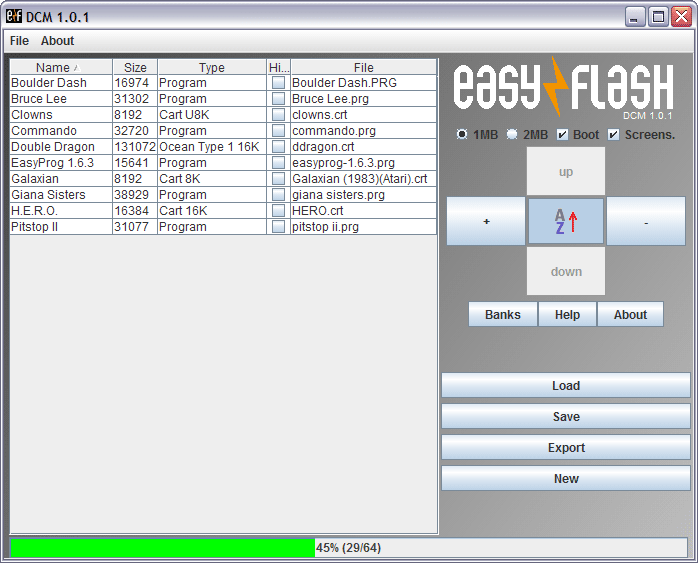
Basic operation
Add files
Files can be simply dragged and dropped into Draco Cart Maker GUI, by pressing the big “+” -button on the right side column, or by selecting File => Add.
Supported file types are:
- Single-load .prg files
- Regular 8k, 16k and Ultimax .crt files
- Ocean type .crt files
Note: Unsupported file types are omitted during import.
Note: Only one Ocean type cartridge image can be added.
Arrange the list
Program names can be edited by double clicking the entry on the Name column.
Programs are automatically sorted alphabetically if the “A-Z” -button on the right side column is active. If deactivated, the list can be sorted manually with the “up” and “down” buttons.
Save the cartridge image
Click the “Save” button to save the multicart image. The created file is ready to be flashed to EasyFlash cartridge.
Options
Under the EasyFlash logo there are few options. Only 1 MB cartridge size is supported by the hardware - 2 MB should not be chosen. “Boot” -option creates a cartridge boot screen. “Screens.” -option adds a screen saver to the multicart menu.
See “Help” for detailed descriptions.
Compatibility
Some .prg files can’t be started from cartridges created with DCM. The reason is most likely that the program expects a certain state of the C64 memory, mostly the zero page. There’s nothing you can do about it except to hack the program in question ;)
Create a custom multicart image with ndefpack
ndefpack - Not Done EasyFlash tool pack - is similar to DCM with some differences:
- No Java required
- Is a free software (GPL/zlib)
- Supports the latest EasyFS2 specification, including xbank cartridges
- Has a separate command line tool and a GUI
- Avalable as sources and as excecutable binaries for Windows and OS X
Basic operation
Basic operation for creating a multicart image with ndefpack is similar to DCM and also very simple.
Add files
Files can be added by selecting Image => Add file… from the menu or by clicking the “+"-button on the right-hand-side menu. Browse and select the file to be added.
The following file types are supported:
- Single-load .prg files
- Generic 8k, 16k and Ultimax .crt files
- Ocean cartridge (no more than one per cartridge)
- EasyFlash xbank cartridges
Arrange list and rename cartridge and entries
The list can be sorted alphabetically by pressing the “A-Z” button or by selecting Image => Sort items. A single entry can be moved in the list by selecting it and using the “up” and “down” -buttons.
Entries can be renamed by selecting Image > Rename item or by pressing the “Ren” -button.
A name can be given to the cartridge. This is done by selecting the first row in the window, and renaming it.
Save the cartridge image
When done creating your custom multicart image, choose File > Save image file (as…) and enter a file name.
Options
ndefpack offers more customization options than DCM, e.g. adding custom boot code or loader is possible. Please refer to ndefpack documents for more advanced operation.
Compatibility
Similar limitations apply to both DCM and ndefpack, but ndefpack offers better compatibility.